Manual
Three instruments in one firmware: STRATA, PALINDROME and BabbleBeat. This page covers only how to move between them. Each instrument plays exactly as it does by itself, and has its own manual:
STRATA · PALINDROME · BabbleBeat
Switching
- Press GLO. The menu opens, from anywhere.
- Turn SELECT to the instrument you want.
- Press SEL. It starts.
To leave the menu without changing anything, press GLO or HOME.
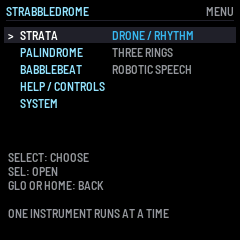
| In the menu | Does |
|---|---|
| SELECT | Moves the highlight |
| SEL | Opens the highlighted row |
| GLO or HOME | Back to the instrument you were in |
Nothing is held, and no two buttons are pressed together.
What happens when you switch
- One instrument runs at a time. Choosing another stops the first and starts the new one afresh, as if the FM-1 had just been switched on with it.
- What you made in the one you left is gone: PALINDROME's rings, BabbleBeat's words. STRATA's saved sound is kept, as always.
- Opening the menu does not stop anything. The instrument keeps sounding under the menu; it only stops when you open a different one.
- Coming back to the same instrument changes nothing: it is as you left it.
While the menu is open
No key, knob or button reaches the instrument. Turn a knob in the menu and nothing changes when you go back.
GLO inside an instrument
GLO is always the menu, so an instrument's own guide (held GLO, by itself) is reached another way: open the menu and choose HELP / CONTROLS. It shows the button guide of the instrument that is running. GLO, HOME or SEL closes it.
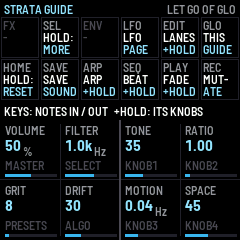
With no instrument open yet, HELP / CONTROLS shows this page's controls instead.
The menu's rows
| Row | Opens |
|---|---|
| STRATA | The drone and rhythm instrument |
| PALINDROME | Three rings |
| BABBLEBEAT | The speaking instrument |
| HELP / CONTROLS | The running instrument's button guide |
| SYSTEM | The version, and which instruments are built in |
A * marks the instrument that is running.
Status
An experimental prerelease: simulator-tested and built for the FM-1, playable in the browser, installed from its page, and not yet run on a real FM-1. Every other control, sound and page belongs to the instrument you are in, and is described in its manual.