Manual
A six-voice FM drone and texture synth with a live arpeggiator, drum kit and four Euclidean rhythm lanes. Tap notes to latch them; turn the knobs to shape the sound.
Play in the browser · Install firmware
Quick start
You'll have a drone going in under 30 seconds.
- Turn MASTER (volume) up.
- Tap a low key, then a key seven notes above it. Two voices fade in and keep going.
- Turn KNOB4 for more reverb, and KNOB1 to make it brighter.
- Press PLAY to fade everything out. Press it again to bring the same notes back.
Playing
Tap a key to latch a note; tap again to release it. A seventh note replaces the oldest of six voices. PLAY fades out and recalls the chord; OCT− / OCT+ shifts the keyboard without retuning existing voices. MASTER is always volume.
The screen
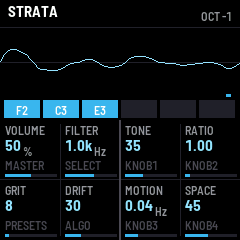
The header shows mode, octave and status. The waveform and six voice boxes indicate activity; the moving dot follows MOTION. The bottom eight cells mirror the physical knob layout, with the active control highlighted.
The knobs
All seven knobs change the sound live, and holding SEL gives you seven more on the same knobs. Turn slowly for fine steps, or quickly to cover the whole range.
Main controls (just turn the knob):
| Knob | Control | What it does | Range |
|---|---|---|---|
| KNOB1 | TONE | Brightness of the FM: pure sine to glassy and buzzy | 0–100 |
| KNOB2 | RATIO | The FM ratio. Whole numbers sound harmonic; in between turns to bells and clangs | 0.5–7 |
| KNOB3 | MOTION | Speed of the slow LFO that makes the sound breathe | 0.01–3 Hz |
| KNOB4 | SPACE | How much reverb | 0–100 |
| SELECT | FILTER | Low-pass cutoff: dark and muffled to fully open | 40 Hz–14 kHz |
| ALGORITHM | DRIFT | Detunes each voice, lets pitch and level wander, widens the stereo | 0–100 |
| PRESETS | GRIT | Feedback in the FM: smooth at 0, rough and noisy near the top | 0–100 |
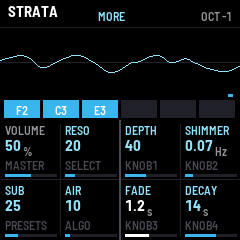
Under SEL (hold SEL and turn; let go to get back):
| Knob | Control | What it does | Range |
|---|---|---|---|
| KNOB1 | DEPTH | How far MOTION moves the tone and the filter | 0–100 |
| KNOB2 | SHIMMER | A slow beating shimmer between the voice's two halves | 0–3 Hz |
| KNOB3 | FADE | How long voices take to fade in and out | 0.1–20 s |
| KNOB4 | DECAY | How long the reverb rings, up to nearly endless | 1.5–60 s |
| SELECT | RESO | Filter resonance: a singing peak at the cutoff | 0–100 |
| ALGORITHM | AIR | Breathy noise, tuned to each voice's pitch | 0–100 |
| PRESETS | SUB | A sine one octave below each voice | 0–100 |
If you're not sure which physical knob is which, turn one and watch which box lights up on the screen.
The arpeggiator
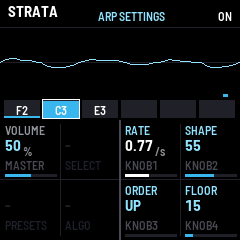
Tap ARP to toggle; hold ARP to adjust its four knobs. The active voice swells while the others fall to FLOOR; a white frame marks the current step. One voice pulses on and off. Changes in latched notes are picked up on the next step.
| Knob (ARP held) | Control | What it does | Range |
|---|---|---|---|
| KNOB1 | RATE | How fast it steps | 0.1–8 steps a second |
| KNOB2 | SHAPE | Sharp steps at 0, slow swells that blend into each other near 100 | 0–100 |
| KNOB3 | ORDER | UP (low to high), DOWN, UP-DN (up and back), RND (random) | 4 choices |
| KNOB4 | FLOOR | How loud the voices off the step stay: silent at 0, nearly full at 100 | 0–100 |
SAVE keeps whether the arp is on and its settings.
The beat
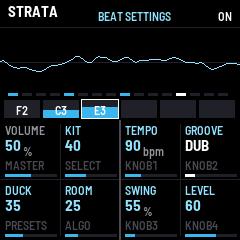
Tap SEQ to toggle; hold SEQ to adjust the beat. A synthesized kick, snare, hats and tuned percussion accompany the drone. The 16-step display shows the playhead; DUCK controls kick-driven pumping. With the beat or lanes running, ARP RATE follows musical divisions.
| Knob (SEQ held) | Control | What it does | Range |
|---|---|---|---|
| KNOB1 | TEMPO | Beats per minute | 60–160 bpm |
| KNOB2 | GROOVE | The pattern, one per click: PULSE, DUB, BREAK, HALF, TOMS, TICK, HEART, DRIVE | 8 grooves |
| KNOB3 | SWING | Straight at 50 %, heavy shuffle at 75 % | 50–75 % |
| KNOB4 | LEVEL | How loud the drums are | 0–100 |
| SELECT | KIT | Dark and low with long tails at 0, bright and snappy at 100 | 0–100 |
| ALGORITHM | ROOM | How much of the drums goes into the reverb (heard as much as SPACE lets it) | 0–100 |
| PRESETS | DUCK | How far the drone dips on each kick: none at 0, deep pumping at 100 | 0–100 |
The grooves:
| Groove | What it is |
|---|---|
| PULSE | Four on the floor, hats off the beat |
| DUB | One drop: kick and snare together on beat three |
| BREAK | A broken breakbeat |
| HALF | Half time, snare on three |
| TOMS | Kick and tuned toms rolling |
| TICK | Minimal: kick and small ticks |
| HEART | A slow lub-dub |
| DRIVE | Driving: kick on every beat, busy hats |
SAVE keeps the beat's settings. The beat never starts by itself: at power-on it is off, whatever was saved, until you tap SEQ.
The Euclidean lanes
Four lanes distribute pulses across independent cycle lengths. Tap EDIT to toggle; hold EDIT to select and edit a lane. Tall blocks = hits, short blocks = rests, white = current step.
A drum lane replaces that drum in the preset groove; with SEQ off, lanes play alone. An ARP lane replaces RATE with its own triggers. All lanes share TEMPO/SWING; enabling a second clock consumer joins without resetting the first. The first hit of each lane is accented.
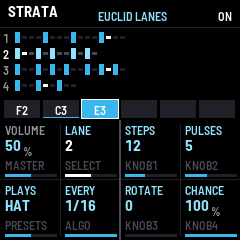
| Knob (EDIT held) | Control | What it does | Range |
|---|---|---|---|
| SELECT | LANE | Which lane the other knobs set | 1–4 |
| KNOB1 | STEPS | How long the lane is | 1–32 |
| KNOB2 | PULSES | How many hits are spread over it | 0 to STEPS |
| KNOB3 | ROTATE | Moves the whole pattern later, a step at a time; it wraps round | 0 to STEPS − 1 |
| KNOB4 | CHANCE | How likely each hit is to play | 0–100 % |
| ALGORITHM | EVERY | How long one step is: 1/1, 1/2, 1/4, 1/8 or 1/16 | 5 lengths |
| PRESETS | PLAYS | OFF, KICK, SNARE, HAT, OPEN (open hat), PERC, or ARP | 7 choices |
The lanes start out as a kick (4 hits over 16), a hat (5 over 12), the arp (7 over 16) and a perc (3 over 9). SAVE keeps all four lanes' settings; like the beat, the lanes are off at power-on until you tap EDIT.
The bitcrusher
Hold PLAY and turn KNOB1 to KNOB4 for the bitcrusher. It sits between the filter and the reverb, so the reverb tails stay smooth while the drone underneath gets coarse. MIX starts at 0 (off); the top of the screen says CRUSH while it is on. A tap of PLAY still fades the chord out and in; turning a knob while PLAY is held doesn't.
| Knob (PLAY held) | Control | What it does | Range |
|---|---|---|---|
| KNOB1 | BITS | How many steps the sound is cut into | 16 bits to 2 |
| KNOB2 | SAMPLE | The rate it holds each sample for: lower is grittier and more aliased | 44.1 kHz to about 400 Hz |
| KNOB3 | DRIVE | How hard it is pushed in first (clipped before it is crushed) | clean to hard |
| KNOB4 | MIX | How much of the crushed sound replaces the clean one | 0 (off) to 100 % |
The LFO page
Tap LFO and its page stays open (the button lit) until you tap LFO again; hold LFO to see it only while held. The screen draws two cycles of the LFO as the knobs shape it, with a dot where it is now. MOTION (on the main layer) is still its speed, and DEPTH (under SEL) how far it moves the tone and the filter. As it starts it is the gentle sine STRATA always had.
| Knob (LFO) | Control | What it does | Range |
|---|---|---|---|
| KNOB1 | WAVE | SINE, TRI, SAW, SQUARE, STEPS (a new random level each cycle), DRIFT (a smooth random wander); between two names, a blend of both | 6 shapes |
| KNOB2 | WARP | Bends the cycle: its first half squeezed (left) or stretched (right); a square becomes a pulse, a sine a lopsided swell | middle: straight |
| KNOB3 | HARMONIC | The speed of a second LFO against the first, locked to it | x1/4, x1/2, x1.5, x2, x3, x5, x7.39 |
| KNOB4 | BLEND | How much of that second LFO: at the top, half and half. With HARMONIC this makes complex, repeating (or, at x7.39, never-quite-repeating) shapes | none to half |
| SELECT | SPREAD | Where each voice sits on the cycle: all together (they breathe as one) or spread round it (they take turns) | 0–100 |
| ALGORITHM | VIBRATO | The LFO on the pitch | 0 to 200 cents |
| PRESETS | TREMOLO | The LFO on the level | none to full |
The LFO's seven are on MIDI CC 85, 86, 87, 89, 90, 14 and 15. SAVE keeps them.
The other buttons
Four more buttons do something besides PLAY, ARP, SEQ, EDIT, LFO and the octave buttons; the rest do nothing in STRATA. (PLAY: a tap fades out and in; held, the bitcrusher.)
- GLO, held, is the guide. The top half of the screen shows what every button does, laid out as the buttons are. Let go and the wave is back. When a button's name tells you nothing, hold GLO.
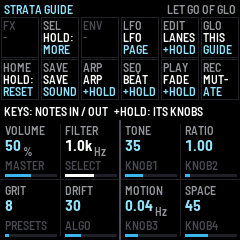
- REC = MUTATE. Nudges the seven main controls a little in random directions. Press it a few times to wander somewhere new.
- HOME, held for one second, resets the sound to how it started. A quick tap only shows which version of STRATA is installed, so you can't reset by accident. It doesn't stop the voices. The version also shows for a moment at power-on.
- SAVE keeps the sound, the octave and the chord that's playing. They come back after you switch off, and PLAY starts the saved chord. SAVE stays lit while there's something new to save.
Recipes
These are starting points; set the values you see on the screen, then play the notes listed. Anything not listed can stay where it is.
| Sound | Main controls | Under SEL | Play |
|---|---|---|---|
| Deep organ | TONE 20, RATIO 1.00, FILTER 800, SPACE 40, DRIFT 20 | SUB 60, FADE 2 s | A low note and the note seven keys up |
| Glass bells | TONE 60, RATIO between 2.50 and 3.00, SPACE 70 | SHIMMER 0.5 Hz, DECAY 30 s, FADE 3 s | Three or four notes spread across the keys |
| Dark storm | GRIT 60, FILTER 300, MOTION 0.05 Hz, SPACE 80 | RESO 60, AIR 50, DEPTH 80, DECAY 60 s | One or two low notes, OCT− pressed once |
| Shimmer pad | TONE 40, RATIO 2.00, DRIFT 60, MOTION 0.20 Hz, SPACE 60 | SHIMMER 1.0 Hz | A chord of three notes |
| Music box ripple | TONE 45, RATIO 3.00, SPACE 70 | DECAY 20 s; ARP on: RATE 3/s, SHAPE 10, ORDER UP-DN, FLOOR 0 | Four notes going up the keys |
| Night drive | TONE 35, RATIO 2.00, FILTER 1.5k, SPACE 50 | ARP on: RATE 1/8, SHAPE 20; SEQ on: TEMPO 118, DRIVE, DUCK 60 | A minor chord of three notes |
| Dub space | TONE 25, RATIO 1.00, SPACE 80 | DECAY 30 s; SEQ on: TEMPO 72, DUB, SWING 60 %, ROOM 70, DUCK 40 | One low note and its fifth |
| Drifting clockwork | TONE 40, RATIO 2.00, SPACE 55 | ARP on, SHAPE 15; EDIT on with the lanes as they start (kick 4/16, hat 5/12, arp 7/16, perc 3/9); SEQ off | Three notes spread across the keys |
| Slow tide | TONE 25, RATIO 1.00, FILTER 1.0k, SPACE 60 | SUB 50; ARP on: RATE 0.3/s, SHAPE 90, FLOOR 30 | A low chord of three notes |
Once a recipe sounds right, press SAVE to keep it.
MIDI
STRATA takes MIDI in over USB and the TRS jack, on any channel.
- Notes play voices while held, like a normal synth. The sustain pedal (CC 64) holds them.
- CC 123 (all notes off) releases the MIDI voices.
- Keys tapped on the FM-1 go out over USB as notes, so a computer can record them.
- CC 20 to 31 and CC 102 to 118 set the twenty-nine controls. (Up to 0.4 they ran from CC 20 to 44, which included two numbers that computers and keyboards send on their own.) CC 115 to 118 are the bitcrusher's BITS, SAMPLE, DRIVE and MIX.
| CC | Control | CC | Control | CC | Control |
|---|---|---|---|---|---|
| 20 | TONE | 29 | FADE | 108 | TEMPO (beat) |
| 21 | RATIO | 30 | DECAY | 109 | GROOVE (beat) |
| 22 | MOTION | 31 | RESO | 110 | SWING (beat) |
| 23 | SPACE | 102 | AIR | 111 | LEVEL (beat) |
| 24 | FILTER | 103 | SUB | 112 | KIT (beat) |
| 25 | DRIFT | 104 | RATE (arp) | 113 | ROOM (beat) |
| 26 | GRIT | 105 | SHAPE (arp) | 114 | DUCK (beat) |
| 27 | DEPTH | 106 | ORDER (arp) | ||
| 28 | SHIMMER | 107 | FLOOR (arp) |
Troubleshooting
| Problem | Fix |
|---|---|
| No sound | Turn MASTER up and tap a key. If FADE is long, voices take that long to come in: hold SEL and turn KNOB3 down. |
| Sound is muffled | FILTER is low: turn SELECT up. |
| The installer can't find the FM-1 | Use Chrome or Edge, try another USB cable, and close other apps or pages that use MIDI. |
| The knobs do M-VAVE things | STRATA isn't installed yet: the screen should say STRATA at the top. |
| "OVERLOAD" on the screen | The sound took too long to make, so the oldest voice was let go. Use fewer voices or less AIR. |
| The voices pulse or take turns | The arp is on: tap ARP to switch it off. |
| Drums are playing | The beat or the lanes are on: tap SEQ or EDIT to stop them (the top of the screen says BEAT or EUC). They are always off at power-on. |
| The arp ignores RATE | A lane is stepping it (RATE shows EUC): hold EDIT and set that lane's PLAYS to something else. |
| The drone pumps or dips | That's DUCK: hold SEQ and turn PRESETS down. |
| Want the original sound back | Hold HOME for a second. |
| Want M-VAVE's firmware back | Use the installer's "Back to the stock firmware" link. |
Installation notes
Use the installer in Chrome or Edge with a USB data cable. Connect, allow MIDI access, then install; leave the device connected until finished. Custom firmware is installed at your own risk. The installer can also restore M-VAVE firmware.
M-VAVE and FM-1 are trademarks of their owners; STRATA isn't affiliated with M-VAVE.